
 Facebook
 Twitter
- Server operating system version
- CloudLinux 8.10
- Plesk version and microupdate number
- 18.0.68
Hello everyone,
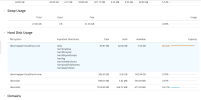
I’m having an issue with the disk space distribution on a server running Plesk + CloudLinux. The current setup looks like this:
/dev/mapper/cloudlinux-root:
Total space: 69.97 GB
Used: 62.50 GB (89.32%)
Available: only 7.47 GB
/dev/mapper/cloudlinux-home:
Total space: 506.50 GB
Used: only 3.56 GB (0.70%)
Available: 502.94 GB
As you can see, the root partition is nearly full, while the home partition remains mostly unused. The VM hosts around 25 domains and 20 hosting accounts.
My questions:
1. Is this a standard configuration when installing Plesk + CloudLinux? Or could something have been misconfigured during the setup?
2. Has anyone faced a similar issue, and how did you resolve it? I’m especially interested in safe methods of redistributing space.
3. What are your recommendations for the optimal partitioning between root and home for a hosting server?
4. Is resizing partitions using LVM safe in a production environment with Plesk? What precautions should be taken?
5. Are there any known issues or pitfalls I should watch out for when modifying partitions in a Plesk + CloudLinux environment?
VM specifications:
Plesk Obsidian
CloudLinux 8.10 (Shared Pro)
RAM: 44 GB
Total disk space: ~700 GB
The cloudlinux-root space is already filling up, and I’m worried about what will happen when it runs out…
Thank you in advance for any help and advice!
I’m having an issue with the disk space distribution on a server running Plesk + CloudLinux. The current setup looks like this:
/dev/mapper/cloudlinux-root:
Total space: 69.97 GB
Used: 62.50 GB (89.32%)
Available: only 7.47 GB
/dev/mapper/cloudlinux-home:
Total space: 506.50 GB
Used: only 3.56 GB (0.70%)
Available: 502.94 GB
As you can see, the root partition is nearly full, while the home partition remains mostly unused. The VM hosts around 25 domains and 20 hosting accounts.
My questions:
1. Is this a standard configuration when installing Plesk + CloudLinux? Or could something have been misconfigured during the setup?
2. Has anyone faced a similar issue, and how did you resolve it? I’m especially interested in safe methods of redistributing space.
3. What are your recommendations for the optimal partitioning between root and home for a hosting server?
4. Is resizing partitions using LVM safe in a production environment with Plesk? What precautions should be taken?
5. Are there any known issues or pitfalls I should watch out for when modifying partitions in a Plesk + CloudLinux environment?
VM specifications:
Plesk Obsidian
CloudLinux 8.10 (Shared Pro)
RAM: 44 GB
Total disk space: ~700 GB
The cloudlinux-root space is already filling up, and I’m worried about what will happen when it runs out…
Thank you in advance for any help and advice!




