
 Facebook
 Twitter
Paul Creedy
Basic Pleskian
Hi
I'm created a Azure vm from the official plesk image and face a certificate error. Linux VM.
I've created the vm and associated resources
SSH'd in
Created a first time log in link
Gone to the link and selected Interface options
On the settings page I add the host name, which exists against the domain name
Entered the dedicated IP address etc.
Domain name/host name is pointing to the dedicated ip address
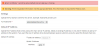
I get this error on submitting
Error: Certificate '' cannot be set as default one: private key is missing
Other posts with this error seem to say to go into Tools and delete the Let's encrypt certificate, however this is during the initial installation, so at this point I have nothing to log into.
I've even tried destroying everything in Azure and building it all again, but ended up with the exact same error.
I'm created a Azure vm from the official plesk image and face a certificate error. Linux VM.
I've created the vm and associated resources
SSH'd in
Created a first time log in link
Gone to the link and selected Interface options
On the settings page I add the host name, which exists against the domain name
Entered the dedicated IP address etc.
Domain name/host name is pointing to the dedicated ip address
I get this error on submitting
Error: Certificate '' cannot be set as default one: private key is missing
Other posts with this error seem to say to go into Tools and delete the Let's encrypt certificate, however this is during the initial installation, so at this point I have nothing to log into.
I've even tried destroying everything in Azure and building it all again, but ended up with the exact same error.
