
 Facebook
 Twitter
hi there
i want to install plesk on server 2008 r2 sp2 ,i check all reqirement contains harddisk,windows installer5 ,iis6 .
every thing are ok .
but i have problem .when i run exe file to install it,the cmd open and firefox open and wat me to enter user and pass. i entered admin 's user and pass.
and then it remain on that page(i attached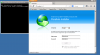 ), for a long time(evevn i tets it and it takes for 2 days!!!!)
and ther is no error that i can undrestand whats the problem.
and i couldnt find anything about it in faq.
plz help me
i want to install plesk on server 2008 r2 sp2 ,i check all reqirement contains harddisk,windows installer5 ,iis6 .
every thing are ok .
but i have problem .when i run exe file to install it,the cmd open and firefox open and wat me to enter user and pass. i entered admin 's user and pass.
and then it remain on that page(i attached
), for a long time(evevn i tets it and it takes for 2 days!!!!)and ther is no error that i can undrestand whats the problem.
and i couldnt find anything about it in faq.
plz help me
