
 Facebook
 Twitter
AlexanderPolizu
New Pleskian
Hi Guys,
This error is displayed when we go to Subscriptions> domain name> File Sharing> Public Files. Attached a screenshot. The error in /var/log/plesk/panel.log is below
ERR [panel] Copy operation failed: source sharing type=shared, source folder=/, target sharing type=external, target folder=/, error=Method Not Allowed
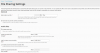
In File Sharing Settings for the same domain everything is enabled except for password protection. Second screenshot. Please help to understand and fix this problem. Thank you.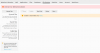
This error is displayed when we go to Subscriptions> domain name> File Sharing> Public Files. Attached a screenshot. The error in /var/log/plesk/panel.log is below
ERR [panel] Copy operation failed: source sharing type=shared, source folder=/, target sharing type=external, target folder=/, error=Method Not Allowed
In File Sharing Settings for the same domain everything is enabled except for password protection. Second screenshot. Please help to understand and fix this problem. Thank you.

