
 Facebook
 Twitter
Current specs/versions
CPU Intel(R) Xeon(R) CPU E5-2660 v4 @ 2.00GHz (2 core(s))
Version Plesk Onyx v17.5.3_build1705170317.16 os_CentOS 7
OS CentOS Linux 7.4.1708 (Core)
The code editor treats *.js files as if they were *.html files. So when writing js you get horrible auto tabbing and line breaks and it can't style variables correctly.
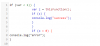
if you add "<script> tags it works fine. However including a *.js file with <script> tags will give you a syntax error and the file won't be included.
Adding <script> tags is a temporary fix while editing but is not ideal.
Sam
CPU Intel(R) Xeon(R) CPU E5-2660 v4 @ 2.00GHz (2 core(s))
Version Plesk Onyx v17.5.3_build1705170317.16 os_CentOS 7
OS CentOS Linux 7.4.1708 (Core)
The code editor treats *.js files as if they were *.html files. So when writing js you get horrible auto tabbing and line breaks and it can't style variables correctly.
if you add "<script> tags it works fine. However including a *.js file with <script> tags will give you a syntax error and the file won't be included.
Adding <script> tags is a temporary fix while editing but is not ideal.
Sam