• The new Python extension is now available. It allows customers to deploy and manage WSGI-based Python applications on their websites directly from Plesk.
  • The Plesk Mobile apps for iOS and Android and the Plesk Mobile Center extension have been deprecated, and are no longer available for new installations. In Plesk Obsidian 18.0.84, the Plesk Mobile Center extension will be removed from servers during the upgrade, and the Plesk Mobile apps will lose their server management features.
  • The Social Login extension has been deprecated and will be removed in Plesk Obsidian 18.0.84. After that, it will no longer be possible to log in to Plesk with a Google, Facebook, GitHub account, or with a passkey. Plesk usernames and passwords, as well as logging in with a WebPros Account, are not affected.

Question Language packs not installed

koreanman

New Pleskian
Server operating system version
Ubuntu 20.04
Plesk version and microupdate number
Plesk Obsidian v18.0.61_build1800240603.06 os
1.png
I was already using VULTR for free as a web edition admin.

I changed to paid because VULTR said they were charging for it.

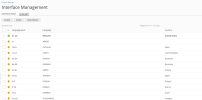
But after changing to paid, I'm getting tons of errors. First, all language packs were disabled except English. Even when I check it and enable it, that yellow exclamation mark greets me.

Also, I keep getting logged out and when I try to log in, it takes several attempts before I finally get logged in.
 
Login issue: Please check "Allow IP address changes during a single session" in Tools & Settings > Security > Session idle Time.

Language Packs: Normally, Plesk comes with one language. For each additional language, an add-on license is required.
 
@koreanman, I am sorry to read you're ran into so many errors.

By default Plesk comes with one language. Which you can change with the "make default" button. If you like to use more than one language, you can buy additional language packs in the Plesk store.

The issue with logging in can be solved followings the post from @Bitpalast.
 
Login issue: Please check "Allow IP address changes during a single session" in Tools & Settings > Security > Session idle Time.

Language Packs: Normally, Plesk comes with one language. For each additional language, an add-on license is required.
Thank you. That part has been fixed.
 
@koreanman, I am sorry to read you're ran into so many errors.

By default Plesk comes with one language. Which you can change with the "make default" button. If you like to use more than one language, you can buy additional language packs in the Plesk store.

The issue with logging in can be solved followings the post from @Bitpalast.
Thank you. It was a rookie mistake, I thought it was an error because apparently they were all green a while ago.
 
Back
Top