
 Facebook
 Twitter
Username: Peter Debik
TITLE
Language tags missing after switching from Power View to Service Provider View right after onboarding
PRODUCT, VERSION, OPERATING SYSTEM, ARCHITECTURE
Obsidian 18.0.34, latest MU
CentOS 7.9
PROBLEM DESCRIPTION
Fresh Plesk installation from original servers.
After the first login, right after entering the licence and seeing the GUI for the first time, I have clicked the "Service Provider View" link in the bottom left corner of the screen.
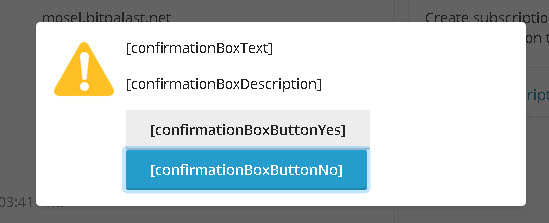
The screen layout changes, but it displays a confirmation dialog box with tag placeholders only:
STEPS TO REPRODUCE
Install Plesk.
Login for the first time.
Switch from Power User View to Service Provider View.
ACTUAL RESULT
Confirmation box with language tag placeholders.
EXPECTED RESULT
Confirmation box with real strings.
ANY ADDITIONAL INFORMATION
YOUR EXPECTATIONS FROM PLESK SERVICE TEAM
Confirm bug
TITLE
Language tags missing after switching from Power View to Service Provider View right after onboarding
PRODUCT, VERSION, OPERATING SYSTEM, ARCHITECTURE
Obsidian 18.0.34, latest MU
CentOS 7.9
PROBLEM DESCRIPTION
Fresh Plesk installation from original servers.
After the first login, right after entering the licence and seeing the GUI for the first time, I have clicked the "Service Provider View" link in the bottom left corner of the screen.
The screen layout changes, but it displays a confirmation dialog box with tag placeholders only:
STEPS TO REPRODUCE
Install Plesk.
Login for the first time.
Switch from Power User View to Service Provider View.
ACTUAL RESULT
Confirmation box with language tag placeholders.
EXPECTED RESULT
Confirmation box with real strings.
ANY ADDITIONAL INFORMATION
YOUR EXPECTATIONS FROM PLESK SERVICE TEAM
Confirm bug


