• The new Python extension is now available. It allows customers to deploy and manage WSGI-based Python applications on their websites directly from Plesk.
  • The Plesk Mobile apps for iOS and Android and the Plesk Mobile Center extension have been deprecated, and are no longer available for new installations. In Plesk Obsidian 18.0.84, the Plesk Mobile Center extension will be removed from servers during the upgrade, and the Plesk Mobile apps will lose their server management features.
  • The Social Login extension has been deprecated and will be removed in Plesk Obsidian 18.0.84. After that, it will no longer be possible to log in to Plesk with a Google, Facebook, GitHub account, or with a passkey. Plesk usernames and passwords, as well as logging in with a WebPros Account, are not affected.

Resolved laravel toolkit: password requirements

Pavlo.UA

Basic Pleskian
Server operating system version
CentOS 7.9
Plesk version and microupdate number
Version 18.0.46 Update #2
Dear Plesk Guru,
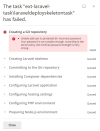
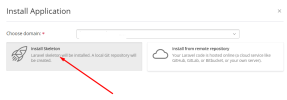
could you please help with Laravel Toolkit extension? Have an error when trying to install Laravel skeleton on newly created domain.
1664422041120.png

-----
1664421837124.png
How can I get what user password is incorrect or it is not strong? I use Very Strong passwords in my Security Policy for ALL users.

Thank you in advance.
 
Solved ))
System user in this subscription was created few years ago, so, may be there was an simple pass. I've changed user password to strong and all works now.
 
Back
Top