
 Facebook
 Twitter
Microsoft Windows Server 2008 R2 Service Pack 1
Panel version 11.0.9 Update #59, last updated at Oct 3, 2013 02:06 AM
MailEnable version 5
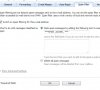
I see in the plesk documentation that the screen to enable SPAM filtering for an individual there is an option to "Move spam to the Spam folder". I don't see that option so I am wondering if it is only available on some versions of Plesk, or in combination with certain mail servers. Can someone tell me how to make that option available?
Thanks!
Panel version 11.0.9 Update #59, last updated at Oct 3, 2013 02:06 AM
MailEnable version 5
I see in the plesk documentation that the screen to enable SPAM filtering for an individual there is an option to "Move spam to the Spam folder". I don't see that option so I am wondering if it is only available on some versions of Plesk, or in combination with certain mail servers. Can someone tell me how to make that option available?
Thanks!
