Facebook
 Twitter
Thomas Oryon
Regular Pleskian
- Server operating system version
- Windows server 2022
- Plesk version and microupdate number
- 18.0.76
Hello Plesk Support,
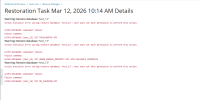
We are receiving a warning when restoring an remote MSSQL database from Plesk Backup Manager.
Error shown:
"Script execution error during restore database 'test_13': User does not have permission to perform this action."
Failed statements:
ALTER DATABASE [test_13] SET TRUSTWORTHY OFF
ALTER DATABASE [test_13] SET HONOR_BROKER_PRIORITY OFF WITH ROLLBACK IMMEDIATE
ALTER DATABASE [test_13] SET DB_CHAINING OFF
We verified that:
"Grant the ALTER DATABASE permission to all Microsoft SQL Server database users"
but the same warning still occurs.
The database appears to restore successfully, but Plesk still reports this warning.
Please advise whether this is a known Plesk issue/limitation and whether this warning can be safely ignored if the restore completes successfully.
Awaiting your reply.
We are receiving a warning when restoring an remote MSSQL database from Plesk Backup Manager.
Error shown:
"Script execution error during restore database 'test_13': User does not have permission to perform this action."
Failed statements:
ALTER DATABASE [test_13] SET TRUSTWORTHY OFF
ALTER DATABASE [test_13] SET HONOR_BROKER_PRIORITY OFF WITH ROLLBACK IMMEDIATE
ALTER DATABASE [test_13] SET DB_CHAINING OFF
We verified that:
- Plesk MSSQL server is configured with sa
- sa is sysadmin
- database owner is sa
- all three database options are already OFF
"Grant the ALTER DATABASE permission to all Microsoft SQL Server database users"
but the same warning still occurs.
The database appears to restore successfully, but Plesk still reports this warning.
Please advise whether this is a known Plesk issue/limitation and whether this warning can be safely ignored if the restore completes successfully.
Awaiting your reply.