
 Facebook
 Twitter
- Server operating system version
- Ubuntu 22.04.3 LTS
- Plesk version and microupdate number
- Plesk Obsidian v18.0.55_build1800230919.07
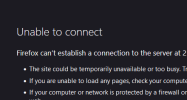
New created docker images are not reachable on the serverip:8096
An older docker image still works with nginx, did i break something in the nginx config? I also read a lot of topics about that a firewall could be interfering so i checked if it worked with the firewall off. That didn't work.. Any tips where to look?

An older docker image still works with nginx, did i break something in the nginx config? I also read a lot of topics about that a firewall could be interfering so i checked if it worked with the firewall off. That didn't work.. Any tips where to look?


