• Inviting everyone who uses WordPress management tools in Plesk
    The Plesk team is conducting a 60-minute research session that includes an interview and a moderated usability test.
    To participate, please use this link .
    Your experience will help shape product decisions and ensure the tools better support real-world use cases.

Question Nginx breaks Magento 2

shogunswb

Basic Pleskian
Server operating system version
Almalinux 8.9
Plesk version and microupdate number
18.0.61 Update #2
I have clean rebuild my server with Almalinux 8, clean install of Plesk & restored my domains from backup.
I have 5 Magento 2.4 sites & all of them are not displaying correctly.
When I go to the homepage the site isn't picking up the css style's & this is with the home directory set to the /pub folder.
If I set the home folder to httpdocs then I get incorrect permissions to view this page even though it should forward to the /pub folder.
If I turn of the nginx service the site's works correctly if I have it set to httpdocs or httpdocs/pub
On my old build of the server with Centos 7 I had Nginx running but some sites I had to set to httpdocs & others to httpdocs/pub & never did quite figure out why.
Do I need to config nginx somehow for Magento?
 
I have 5 Magento 2.4 sites & all of them are not displaying correctly.

Please see the Plesk Logs for the domain first. Then you can see what is the actual issue is.

When I go to the homepage the site isn't picking up the css style's & this is with the home directory set to the /pub folder.

Have you tried this in the Developer mode? If your website is currently in the Production mode, changing the home directory may cause this issue.
 
I'm in Magento 2.4 / Nginx hell too. You need to set it to the root to the /pub directory for Magento security. The problem with Nginx is the inability to modify the server root Location ~/ setting to allow Magento's router to rewrite URLs correctly. I'm currently looking for a method to override. I've wasted hours trying to resolve this, and I'm furious that this isn't simple, which is the whole point of using Plesk to administer a server. Plesk should enable easy templating of configuration files that can be specified in the Service Plan, such as "Magento Hosting," and append to a custom Nginx.conf for those plans.
 
I'm in Magento 2.4 / Nginx hell too. You need to set it to the root to the /pub directory for Magento security. The problem with Nginx is the inability to modify the server root Location ~/ setting to allow Magento's router to rewrite URLs correctly. I'm currently looking for a method to override. I've wasted hours trying to resolve this, and I'm furious that this isn't simple, which is the whole point of using Plesk to administer a server. Plesk should enable easy templating of configuration files that can be specified in the Service Plan, such as "Magento Hosting," and append to a custom Nginx.conf for those plans.
In Plesk go to your domain, click on the hosting & dns tab then click hosting, under hosting type set the document root to httpdocs/pub.
Go back to hosting & dns, click onto Apache & nginx go down to nginx settings & tick proxy mode.

if that doesn't work check your htaccess file both at root & pub for rewrites.
 
In Plesk go to your domain, click on the hosting & dns tab then click hosting, under hosting type set the document root to httpdocs/pub.
Go back to hosting & dns, click onto Apache & nginx go down to nginx settings & tick proxy mode.

if that doesn't work check your htaccess file both at root & pub for rewrites.

I fixed it by creating a custom nginx.conf for the domain, and making the file immutable so Plesk can't overwrite it. Magento is working incredibly well now; page load times are wicked fast.
 
I fixed it by creating a custom nginx.conf for the domain, and making the file immutable so Plesk can't overwrite it. Magento is working incredibly well now; page load times are wicked fast.
Any chance of sharing the custom nginx.conf file?
 
I fixed it by creating a custom nginx.conf for the domain, and making the file immutable so Plesk can't overwrite it. Magento is working incredibly well now; page load times are wicked fast.
Hi, can you share the custom nginx.conf file and how to make it imune to plesk overwrite?
 
I still prefer the Nginx → Varnish → Apache setup.

In Magento 2, many directories include .htaccess files (rewrites/rules/overrides). With this stack, Apache can still apply those rules properly while Nginx + Varnish handle the heavy lifting in front, so it stays compatible and performs well.

Also, it’s pretty easy to set up Varnish in Docker on Plesk, which makes deployment and management straightforward.
 
I still prefer the Nginx → Varnish → Apache setup.

In Magento 2, many directories include .htaccess files (rewrites/rules/overrides). With this stack, Apache can still apply those rules properly while Nginx + Varnish handle the heavy lifting in front, so it stays compatible and performs well.

Also, it’s pretty easy to set up Varnish in Docker on Plesk, which makes deployment and management straightforward.
Is this configuration suitable for multi website configuration?
 
Hi @WebHostingAce
You already saved me a lot of headache. From several days I was trying to find solution why in my magento 2 subsites ttfb is much higher (main site 250ms vs subsites 900ms) . In my apache .htaacces file I changed in my rewrite rules from website to store, and subsites started to behave like the main site.
In the coming days I will try to install and configure varnish with docker.

Thanks again.
 
Hi @WebHostingAce this weekend I tried to make it work with Varnish, but couldnt make it work, I messed with the IPs.
magento2.jpg
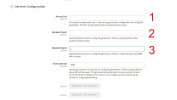
Which IP should be in position 1, 2 and the port in 3?
External plesk IP (something like 52.34.45.56 ), the docker network IP which is something like 172.168.0.1 and the port in position 3 is which we use in docker container in my case 32780.

plesk-docker.jpg

Do we need to add some directives to apache.jpg
nginx.jpg

I know about the firewall part and docker proxy rule, and have to remove some of the lines in VCL file.
Can you explain, position 1 this IP, position 2 this and so on.

Thanks in advance.
 
1. localhost (Let’s edit the VCL once downloaded)
2. IPv4 of the website
3. 7080

Download the VCL for Vanish 6

Code:
backend default {
    .host = "Point 2 should be in here";
    .port = "7080";
    .first_byte_timeout = 600s;
#    .probe = {
#        .url = "/health_check.php";
#        .timeout = 2s;
#        .interval = 5s;
#        .window = 10;
#        .threshold = 5;
#   }
}

acl purge {
    "localhost";
    "127.0.0.1";
    "::1";
    "172.17.0.0/16";
    "Point 2 IP should be in here";
}

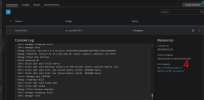
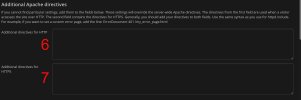
Point 4 and 5 (not for the main website)
SetEnvIf Host subdomain.or.multistore.tld* MAGE_RUN_CODE=abcd
SetEnvIf Host subdomain.or.multistore.tld* MAGE_RUN_TYPE=store

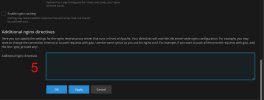
6. I'm not aware of your M2 version, usually this is,

Code:
proxy_buffer_size   128k;
proxy_buffers   4 256k;
proxy_busy_buffers_size   256k;
 
I noticed this,

Warning: mlock() of VSM failed: Cannot allocate memory (12)

Did you start the docker with --ulimit memlock=-1:-1 as I have mentioned in my other post?
 
Back
Top