Facebook
 Twitter
forzasalva
New Pleskian
- Server operating system version
- AlmaLinux 9.5
- Plesk version and microupdate number
- Plesk Obsidian 18.0.65
Hi folks,
I have a problem with my NGINX proxy cache.
(Plesk Obsidian on AlmaLinux 9)
My settings are as follows in Plesk for the domain:
Proxy mode: on
Intelligent processing of static files: on
Serve static files directly through nginx: off
Cache size: 512MB
Time limit: 30 days
Key: $scheme$request_method$host$request_uri
My additional instructions:
set $no_cache 0;
proxy_cache_valid 200 30d;
proxy_cache_valid 404 10m;
proxy_cache_valid 206 30d;
add_header Cache-Control “public, max-age=2592000”;
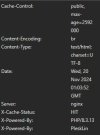
The main domain is cached and the header also contains “HIT”.
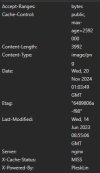
Unfortunately, however, the static files (jpg, css, js, mp4, etc.) are not cached and “MISS” is constantly displayed.
What could be the reason for this?
Here is the nginx.conf generated by Plesk: NGINX Conf - PLesk - Pastebin.com
I have a problem with my NGINX proxy cache.
(Plesk Obsidian on AlmaLinux 9)
My settings are as follows in Plesk for the domain:
Proxy mode: on
Intelligent processing of static files: on
Serve static files directly through nginx: off
Cache size: 512MB
Time limit: 30 days
Key: $scheme$request_method$host$request_uri
My additional instructions:
set $no_cache 0;
proxy_cache_valid 200 30d;
proxy_cache_valid 404 10m;
proxy_cache_valid 206 30d;
add_header Cache-Control “public, max-age=2592000”;
The main domain is cached and the header also contains “HIT”.
Unfortunately, however, the static files (jpg, css, js, mp4, etc.) are not cached and “MISS” is constantly displayed.
What could be the reason for this?
Here is the nginx.conf generated by Plesk: NGINX Conf - PLesk - Pastebin.com