• The APS Catalog has been deprecated and removed from all Plesk Obsidian versions.
    Applications already installed from the APS Catalog will continue working. However, Plesk will no longer provide support for APS applications.
  • Please be aware: with the Plesk Obsidian 18.0.78 release, the support for the ngx_pagespeed.so module will be deprecated and removed from the sw-nginx package.

Issue node permissions problem

Michael-456

New Pleskian
Server operating system version
Windows Server 2022 Datacenter 21H2
Plesk version and microupdate number
Plesk Obsidian v18.0.56_build20231027.01
Hello guys, I have had this problem for a while, when I deploy a Laravel application there is a problem in vite, I can’t build my applications with npm run build, I have tried everything, I can

I have find out that it may be a permissions problem, because in my administrator user out of plesk in my cmd it builds and works fine in the server. but in the same machine using the user that plesk created connected as remoted desktop, it doesn’t work and I get the same problem.

Does anyone had had this issue, or know how could I fix it?

This only happen on Windows Server, in Linux servers build fine.
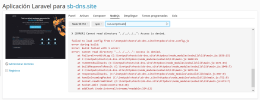
 

Attachments

  • laravel problema.png
    laravel problema.png
    124 KB · Views: 24
Double check that your c:\Inetpub\vhosts\sb-dns.site\httpdocs folder has both IIEUser has read & execute permission and your specific system user (which you can find by going to the subscription and looking at the bottom where it says "system user") has modify permission and is applied to all files and sub directories because it's saying it can't read the file located in httpdocs\vite.config.js (which requires read & execute permission).
 
Double check that your c:\Inetpub\vhosts\sb-dns.site\httpdocs folder has both IIEUser has read & execute permission and your specific system user (which you can find by going to the subscription and looking at the bottom where it says "system user") has modify permission and is applied to all files and sub directories because it's saying it can't read the file located in httpdocs\vite.config.js (which requires read & execute permission).
hello thanks for your answer, I have checked permissions during the hole day. it did't work, this is so fustrating :(

I have also checked older versions of laravel and those which use laravel mix and webpack works complety fine and normal so, I guest the plesk user is been created missing an spesific feature o permition to run vite-build propertly on windows.

failed to load config from C:\inetpub\vhosts\sb-dns.site\asd\vite.config.js
error when starting dev server:
Error: The service was stopped
at C:\inetpub\vhosts\sb-dns.site\asd\node_modules\esbuild\lib\main.js:1083:25
at responseCallbacks.<computed> (C:\inetpub\vhosts\sb-dns.site\asd\node_modules\esbuild\lib\main.js:703:9)
at Socket.afterClose (C:\inetpub\vhosts\sb-dns.site\asd\node_modules\esbuild\lib\main.js:693:28)
at Socket.emit (node:events:526:35)
at endReadableNT (node:internal/streams/readable:1359:12)
at process.processTicksAndRejections (node:internal/process/task_queues:82:21)
 
This issue has been reported many times all over the Internet over several years (here is another Plesk community question), and yet not one report seems to have anything approaching an answer.

It seems like whatever user the Laravel Toolkit is using to run Node commands does not have sufficient permissions on some parent directory or the Vite config file, affecting both deployment scripts and commands executed via the Node.js tab in the Laravel Toolkit.

But what user is actually being used? Doing npm whoami only shows that there is no currently logged-in user. (How else can one see what user’s permissions the current session has?)

And what folder/file permission is missing? Other npm commands that don’t depend on external files can be executed with no problem, such as npm list for example, so permissions on the node_modules folder are clearly fine. Comparing the permissions on the containing httpdocs folder with those on the node_modules folder or the esbuilds/lib/main.js file itself, I can’t see any difference: the same users have the same permissions.
 
Note: RDP’ing into the server and running the command directly from a command prompt (even without running as administrator) works fine, with no permission issues; so it must be related specifically to the context Plesk or the Laravel Toolkit uses to run Node.js or npm commands. There’s just absolutely no documentation of what that context is.
 
If anyone's interested. I reported this bug in January 2025. Plesk first tried to say that it was the application's problem, but after I provided them with a test case (vanilla/unaltered install of Laravel via Plesk's Laravel Toolkit) they accepted it as a valid bug.

This was the response that was relayed to me via my license reseller on the 19th Jan 2025.... I've had no updates since.

Plesk developer has confirmed the bug with the ID PPPM-14770.

It will be fixed in the future Plesk updates.
Please follow the Plesk change log:
https://docs.plesk.com/release-notes/obsidian/change-log/

Currently, that is not the workaround without granting access permissions for all users on each directory in the path to the subscription directory.
That is unsecured and they do not recommend doing it.

An alternative solution for your case is to subscribe to a migration subscription to the Linux server and install the Laravel application there.
 
If anyone's interested. I reported this bug in January 2025. Plesk first tried to say that it was the application's problem, but after I provided them with a test case (vanilla/unaltered install of Laravel via Plesk's Laravel Toolkit) they accepted it as a valid bug.

This was the response that was relayed to me via my license reseller on the 19th Jan 2025.... I've had no updates since.
Thank you for the update – so at least we’re not crazy, and it actually is a bug. Though of course Plesk doesn’t actually let people see bug reports and statuses.

I guess we’re just stuck with manually building our Vite assets via RDP whenever we deploy an app with the Laravel Toolkit, until someone decides it’s worth their time to get it fixed. :-/
 
Back
Top