• Debian 11 is approaching its end-of-life (vendor EOL date - August 31, 2026). Plesk Obsidian 18.0.80 will be the last release to support it.
    If you are running Plesk Obsidian on Debian 11, we recommend you upgrade those servers to Debian 12 using our dist-upgrade tool.
  • We plan to deprecate and remove the support for XML RPC protocol versions earlier than 1.6.9.1 in Plesk Obsidian 18.0.82. We strongly recommend that you update all existing integrations using earlier versions of the XML RPC protocol to comply with the version 1.6.9.1 specification.

Question Outdated php version

gggennari

New Pleskian
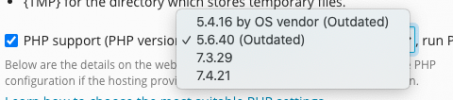
I have installed PHP v. 7.3 and 7.2 (outdated). I can't choose the 7.2 in the drop down menu 'cose is outdated but i need to use it.
How can i do?
1626776445447.png
 
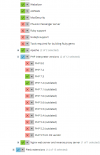
On the image you've posted the PHP 7.2 version is green and checked. Meaning it's already installed on your server. If you want to use it for a domain, simply navigate to the domain in Plesk and go the PHP settings and select version 7.2 there.

Schermafbeelding 2021-07-20 om 13.27.07.png
 
Is suspect you might have Restricted Mode enabled.
Check your permissions for Restricted Mode at Tools & Settings > Restricted Mode Settings > Hosting Tools and see if the "PHP version and handler management" option is checked.

You can also disabled disable Restricted Mode via CLI plesk bin poweruser --on -simple false
 
Back
Top