Follow along with the video below to see how to install our site as a web app on your home screen.
Note: This feature may not be available in some browsers.
We value your experience with Plesk during 2025 Plesk strives to perform even better in 2026. To help us improve further, please answer a few questions about your experience with Plesk Obsidian 2025. Please take this short survey: https://survey.webpros.com/
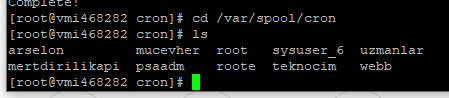
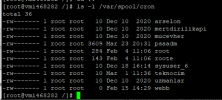
It seems that an existing cron file in /var/spool/cron/ has a wrong format or content or cannot be read or written for insufficient permissions. You will need to investigate the permissions of /var/spool/cron/ and its contents and possibly the format of the files in that path to find the reason why a file cannot be parsed.
Peter thank you for your reply, the permissions are all right, I have renamed the file root in /var/spool/cron/ and created a new root file this solved the error for me