• Halloween is coming! To celebrate the occasion, we dusted off a couple of old skins, and even created a brand new one (Pixel).
    To get into the festive spirit, install the Skins extension.
  • The new Python extension is now available. It allows customers to deploy and manage WSGI-based Python applications on their websites directly from Plesk.
  • The Plesk Mobile apps for iOS and Android and the Plesk Mobile Center extension have been deprecated, and are no longer available for new installations. In Plesk Obsidian 18.0.84, the Plesk Mobile Center extension will be removed from servers during the upgrade, and the Plesk Mobile apps will lose their server management features.
  • The Social Login extension has been deprecated and will be removed in Plesk Obsidian 18.0.84. After that, it will no longer be possible to log in to Plesk with a Google, Facebook, GitHub account, or with a passkey. Plesk usernames and passwords, as well as logging in with a WebPros Account, are not affected.

Resolved PHP 8.2 - Deprecated function: Using ${var}

Jürgen_T

Regular Pleskian
Since I upgraded from php 8.1 to php 8.2 I got some deprecation warnings like "Deprecated function: Using ${var} in strings is deprecated, use {$var} instead" In some cases I could solve it by replacing used variables i.e. ${var} by ${var}.

But I have no idea how to solve this following warning by Drupal 10:

Deprecated function: Using ${var} in strings is deprecated, use {$var} instead in include() (line 571 of /var/www/vhosts/tenckhoff.de/httpdocs/vendor/composer/ClassLoader.php)

On line 571 I found the following code:

569 function includeFile($file)
570 {
571 include $file;
572 }

Is there any proposal what I can try to get rid of this deprecation warning?

 

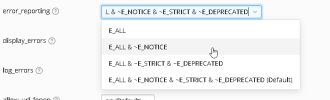
or in Plesk set the error reporting level for your PHP scripts from the drop down (or enter your individual setting):

1682930608841.png

However, it is likely that your script sets its own error_reporting() so that will override the general setting of PHP via Plesk. It is best to control error reporting with the error_reporting() function in a script, e.g.
error_reporting(0)
to disable all (on production systems, not recommend on development systems).
 
Hi Peter, thank you for the quick advice - this helped! Now I got rid of the message in the prod. environment and have time to find a general solution for the concerned deprecated files:)
 
Back
Top