• We value your experience with Plesk during 2025
    Plesk strives to perform even better in 2026. To help us improve further, please answer a few questions about your experience with Plesk Obsidian 2025.
    Please take this short survey:

    https://survey.webpros.com/

Resolved PHP Composer PlugInManager problem

sapo

New Pleskian
Server operating system version
Alma Linux 8.6
Plesk version and microupdate number
Version 18.0.45 Update #2
Hi !
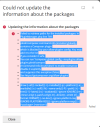
I have a problem, If i runningb PHP Coposer under my Plesk.
I attached one picture from roblem !
I have Alma Linux 8.6 on the Server and I use Plesk Obsidian Version 18.0.45 Update #2

What is the problem issue ?

Regards,
SAPO
 

Attachments

  • phpcompser.png
    phpcompser.png
    82.8 KB · Views: 11
The problem is solved with Plesk Support Team !

The Solution:

  1. Log into Plesk.
  2. Go to Domains > example.com > File Manager.
  3. Open composer.json file in Home Directory > .composer:
    Untitled_border.png
  4. Change the file content from:

    {
    "require": {
    "plesk/composer-command-info": "~1.1.0"
    }
    }

    To
    {
    "require": {
    "plesk/composer-command-info": "~1.1.0"
    },
    "config": {
    "allow-plugins": {
    "plesk/composer-command-info": true
    }
    }
    }
  5. Press the Save button.
 
Back
Top