• Debian 11 is approaching its end-of-life (vendor EOL date - August 31, 2026). Plesk Obsidian 18.0.80 will be the last release to support it.
    If you are running Plesk Obsidian on Debian 11, we recommend you upgrade those servers to Debian 12 using our dist-upgrade tool.
  • We plan to deprecate and remove the support for XML RPC protocol versions earlier than 1.6.9.1 in Plesk Obsidian 18.0.82. We strongly recommend that you update all existing integrations using earlier versions of the XML RPC protocol to comply with the version 1.6.9.1 specification.

Resolved PHP Composer PlugInManager problem

sapo

New Pleskian
Server operating system version
Alma Linux 8.6
Plesk version and microupdate number
Version 18.0.45 Update #2
Hi !
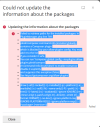
I have a problem, If i runningb PHP Coposer under my Plesk.
I attached one picture from roblem !
I have Alma Linux 8.6 on the Server and I use Plesk Obsidian Version 18.0.45 Update #2

What is the problem issue ?

Regards,
SAPO
 

Attachments

  • phpcompser.png
    phpcompser.png
    82.8 KB · Views: 11
The problem is solved with Plesk Support Team !

The Solution:

  1. Log into Plesk.
  2. Go to Domains > example.com > File Manager.
  3. Open composer.json file in Home Directory > .composer:
    Untitled_border.png
  4. Change the file content from:

    {
    "require": {
    "plesk/composer-command-info": "~1.1.0"
    }
    }

    To
    {
    "require": {
    "plesk/composer-command-info": "~1.1.0"
    },
    "config": {
    "allow-plugins": {
    "plesk/composer-command-info": true
    }
    }
    }
  5. Press the Save button.
 
Back
Top