Facebook
 Twitter
Hello everybody im new in the forum and in the plesk administration so far. So we performed a migration this past weekend of one of our domains to a new Server with Windows Server 2016 and this domain had a PHP Website on it working with PHP 7.1. By the way this Website worked perfectly in the previous installation.
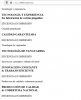
After the migration was finished we realized that the website wasnt loading any images or styles at all, it's only displaying plain text like i can show you on the image attached. I have already checked the page files of the website opening them on a browser and images in fact are displayed there.
What are we missing here in this configuration, maybe something in IIS settings? Thanks a lot for your help
After the migration was finished we realized that the website wasnt loading any images or styles at all, it's only displaying plain text like i can show you on the image attached. I have already checked the page files of the website opening them on a browser and images in fact are displayed there.
What are we missing here in this configuration, maybe something in IIS settings? Thanks a lot for your help