
 Facebook
 Twitter
marcomm_bumi
New Pleskian
Hi, I`m new here, and my english is not that good.
I have an issue about website dir, the website that I want to move is stillwatercoffee.co.id.
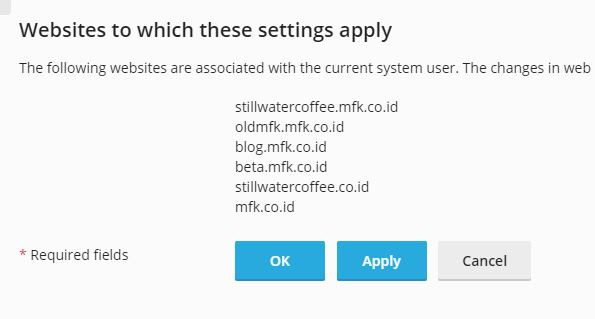
it was migration from CPanel to plesk. at CPanel stillwatercoffee.co.id is addOn domain on mfk.co.id.
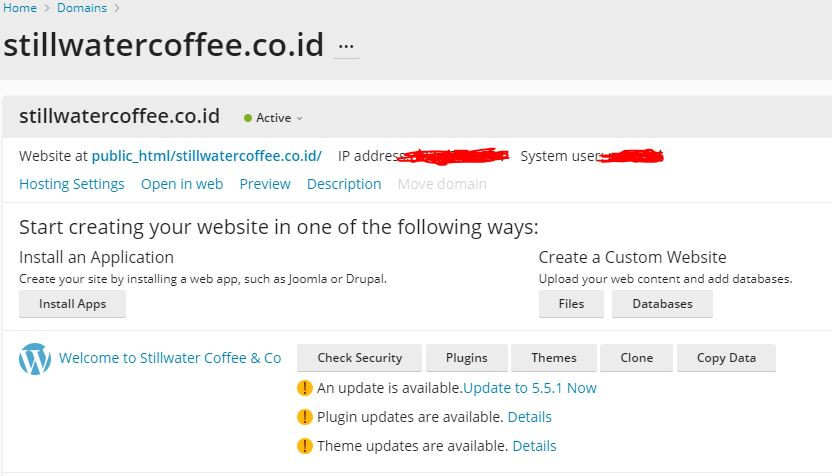
After migration it still stick to mfk.co.id folder website (public_html/stillwatercoffee.co.id).
I create stillwater domain and want to move its file from mfk.co.id, to stillwatercoffee.co.id.
but, stillwater file manager is connect to mfk folder. so how to separate it?
and if I open web access it still become one with mfk.
Please Help!
I have an issue about website dir, the website that I want to move is stillwatercoffee.co.id.
it was migration from CPanel to plesk. at CPanel stillwatercoffee.co.id is addOn domain on mfk.co.id.
After migration it still stick to mfk.co.id folder website (public_html/stillwatercoffee.co.id).
Rich (BB code):


I create stillwater domain and want to move its file from mfk.co.id, to stillwatercoffee.co.id.
but, stillwater file manager is connect to mfk folder. so how to separate it?
Rich (BB code):
and if I open web access it still become one with mfk.
Rich (BB code):
Please Help!
Last edited:


