Facebook
 Twitter
L
lefteris
Guest
Dear all.
I'm fresh to plesk , and i have a problem with my plesk V10.4.4 (windows 2k8 64b IIS7.5)
I try to install the .net 4.0 but inside the domain properties i cannot see the version 4 in the drop down menu.
i can see the default version 2.0 but not v 4.0
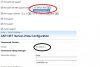
inside the asp.net support (ASP.NET Server-Wide Configuration) i can see the
Framework Version
Version 4.0.30319.1
but in the
Home>Subscriptions>domain_name>Websites & Domains>ASP.NET Configuration for Website Tools
Framework Version
Version 2.0.50727.4927
and in the
Home>Subscriptions>domain_name>Websites & Domains>Hosting Settings for .....
in the Web Scripting and Statistics i can choose only the version 2.0.50727.4927 i cannot choose the version 4 because is not visible.
any help please!