Facebook
 Twitter
Hi:
OS: Linux 2.6.18-164.2.1.el5PAE
Plesk: 9.3.0
RAM:3.8 GB free of 4.0 GB
HD: 364.3 GB free of 448.9 GB
I have some problems with the Backup Manager backing up individual domains
1. The size of backup files is a lot bigger than disk usage according to Domains data
Domain ---------- Backup ------ Multivolume
a) 1.98 GB ------ 4.24 GB ----- 4.24 GB
b) 23.2 MB ------ 1.0 GB
2. I can not download domain a) backup file, status bar shows the message waiting for xx.xxx.xxx.xxx ...
If I click the Refresh button or try to select any other menu after 40 min, I receive the error "Firefox can't establish a connection to the server at xx.xxx.xxx.xxx:8443 and I must restart the server
3. Task progress bar doesn't update (OS X 10.5.8, FF 3.6.17)
4. I can not configure global backup settings according to help as that option doesn't appear
Go to Home > Server group title menu > Backup Settings.
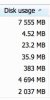
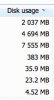
5. Not precisely Backup Manager, but I'd wish to know wich algorithm uses Plesk to sort domains listing by Disk usage!
Thanks in advance
OS: Linux 2.6.18-164.2.1.el5PAE
Plesk: 9.3.0
RAM:3.8 GB free of 4.0 GB
HD: 364.3 GB free of 448.9 GB
I have some problems with the Backup Manager backing up individual domains
1. The size of backup files is a lot bigger than disk usage according to Domains data
Domain ---------- Backup ------ Multivolume
a) 1.98 GB ------ 4.24 GB ----- 4.24 GB
b) 23.2 MB ------ 1.0 GB
2. I can not download domain a) backup file, status bar shows the message waiting for xx.xxx.xxx.xxx ...
If I click the Refresh button or try to select any other menu after 40 min, I receive the error "Firefox can't establish a connection to the server at xx.xxx.xxx.xxx:8443 and I must restart the server
3. Task progress bar doesn't update (OS X 10.5.8, FF 3.6.17)
4. I can not configure global backup settings according to help as that option doesn't appear
Go to Home > Server group title menu > Backup Settings.
5. Not precisely Backup Manager, but I'd wish to know wich algorithm uses Plesk to sort domains listing by Disk usage!
Thanks in advance