
 Facebook
 Twitter
- Server operating system version
- Linux
- Plesk version and microupdate number
- Unsure - see last sentence
I'm new to this so please forgive this basic question. My domain registrar (Marcaria) offers a free-tier Plesk hosting. I've set it up and want to get an SSL certificate, but all docs and forum posts talk about installing extensions (e.g. Let's Encrypt). However, my sidebar shows no Extensions section, and generally looks like it has less than what I see in most screenshots e.g. no Home section etc. Am I doing something wrong? Is it perhaps that this free offering is just an extremely basic one?
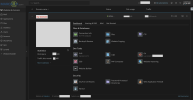
Screenshots below with info greyed out. Any applications, dev tools etc shown are the default.
Websites & Domains page:
Clicking through to SSL/TLS Certificates:
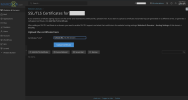
I can't even see the server OS version nor the Plesk version and microupdate that I'm meant to provide for posting here, as the info mentioned here doesn't appear in my view!
Screenshots below with info greyed out. Any applications, dev tools etc shown are the default.
Websites & Domains page:
Clicking through to SSL/TLS Certificates:
I can't even see the server OS version nor the Plesk version and microupdate that I'm meant to provide for posting here, as the info mentioned here doesn't appear in my view!


