
 Facebook
 Twitter
Hi,
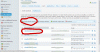
I'm experiencing an odd issue with the Plesk installation on my server. Sometimes, when I (or any customers) login to the web administrator portal and attempt to edit an email account (or create a new one), the page load never occurs. I never get a timeout message but it never completes either - the browsers just show the loading animation:
I've tried this in multiple browsers and from my PC and directly on the server itself.
If I reboot the server, the problem goes away for a while.
I was worried the server was over burdened so I increased the RAM to 8GB. The diskspace, RAM and CPU now have plenty of unused capacity but the problem persists.
Anyone else seen this or have any suggestions for diagnosing the problem?
Thanks
Bob
I'm experiencing an odd issue with the Plesk installation on my server. Sometimes, when I (or any customers) login to the web administrator portal and attempt to edit an email account (or create a new one), the page load never occurs. I never get a timeout message but it never completes either - the browsers just show the loading animation:
I've tried this in multiple browsers and from my PC and directly on the server itself.
If I reboot the server, the problem goes away for a while.
I was worried the server was over burdened so I increased the RAM to 8GB. The diskspace, RAM and CPU now have plenty of unused capacity but the problem persists.
Anyone else seen this or have any suggestions for diagnosing the problem?
Thanks
Bob

