Facebook
 Twitter
- Server operating system version
- Ubuntu 22.04.5 LTS
- Plesk version and microupdate number
- Plesk Obsidian Web Host Edition 18.0.74 Update #3
Hello,
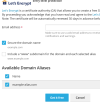
I’m experiencing an issue in Plesk Obsidian Web Host Edition 18.0.74 Update #3 where domain aliases are not being included in the Let’s Encrypt certificate for the main domain.
Setup:
Problem:
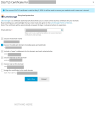
When issuing or reinstalling the Let’s Encrypt certificate, the wizard only includes the main domain (and www), and the aliases are not listed or added to the certificate SAN. As a result, accessing an alias over HTTPS serves the default server certificate and causes a certificate name mismatch.
I have already tried:
Any help or guidance would be appreciated.
I’m experiencing an issue in Plesk Obsidian Web Host Edition 18.0.74 Update #3 where domain aliases are not being included in the Let’s Encrypt certificate for the main domain.
Setup:
- One main domain with hosting and valid Let’s Encrypt certificate.
- Several domains configured as Domain Aliases pointing to that main domain.
- DNS is correctly pointing to the server and HTTP works for all aliases.
Problem:
When issuing or reinstalling the Let’s Encrypt certificate, the wizard only includes the main domain (and www), and the aliases are not listed or added to the certificate SAN. As a result, accessing an alias over HTTPS serves the default server certificate and causes a certificate name mismatch.
I have already tried:
- Reissuing the certificate.
- Unassigning and reinstalling the certificate.
- Recreating aliases.
- Confirming DNS resolution is correct.
Any help or guidance would be appreciated.