
 Facebook
 Twitter
- Server operating system version
- Ubuntu
- Plesk version and microupdate number
- Plesk Obsidian 18.0.76 Update 4
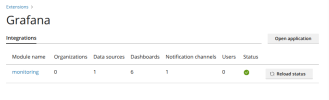
We have Plesk Obsidian on a Ubuntu VPS. We have the Monitoring Extension installed and the Grafana extension installed. We get graphs and threshold alerts as per normal.
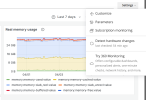
However recently I discovered that when I log into Plesk as an admin, go to Monitoring, click on the Settings dropdown in the upper right, the Thresholds option no longer exists. I know it used to be there because I set the current thresholds this way. I've been through various searches to find if this setting moved and I can't seem to find it.
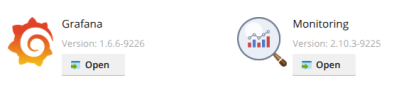
We have Grafana 1.6.6-9226 extension installed.
And Monitoring 2.10.3-9225 extension installed.
Everything else works fine.
Any clues on how to find where the Thresholds setting went or how to re-enable it? Thank you!
However recently I discovered that when I log into Plesk as an admin, go to Monitoring, click on the Settings dropdown in the upper right, the Thresholds option no longer exists. I know it used to be there because I set the current thresholds this way. I've been through various searches to find if this setting moved and I can't seem to find it.
We have Grafana 1.6.6-9226 extension installed.
And Monitoring 2.10.3-9225 extension installed.
Everything else works fine.
Any clues on how to find where the Thresholds setting went or how to re-enable it? Thank you!


