• The APS Catalog has been deprecated and removed from all Plesk Obsidian versions.
    Applications already installed from the APS Catalog will continue working. However, Plesk will no longer provide support for APS applications.
  • Please be aware: with the Plesk Obsidian 18.0.78 release, the support for the ngx_pagespeed.so module will be deprecated and removed from the sw-nginx package.

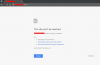
Question plesk on windows server can not access

Arron Ashab

New Pleskian
someone can help me ..

I installed plesk on windows server 2012, and yesterday I restarted my server through plesk.

until now plesk and my windows server can not be accessed.

Please help me.Screenshot_1.png Screenshot_2.png
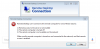
 
This error is caused by having no Internet connection or a misconfigured network. It can also be caused by unresponsive DNS sever or firewall preventing browser from accessing the network. Try to check with restarting DNS client through "Run>services.msc>DNS Client>Restart"
 
Hello,

Hope you are doing well...!!

Please check with the below steps.

1. Check with the Port you are using is correct.
2. Check with the Network configuration.
3. If port is incorrect try to resolve it via VNC.
4. Check with the Firewall connection.

Thank you
 
Back
Top