Facebook
 Twitter
enerspace
Basic Pleskian
Username:
TITLE
Plesk repair / constraint violation: 1062 Duplicate entry
PRODUCT, VERSION, OPERATING SYSTEM, ARCHITECTURE
Plesk Obsidian 18.0.75, CloudLinux 8.10
PROBLEM DESCRIPTION
When you enter the command:
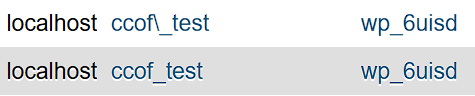
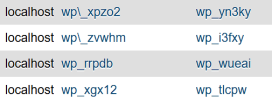
I was able to narrow down the problem further. When a new database and a new database user are created, the following entry is generated in the
However, the entry should be created as follows:
STEPS TO REPRODUCE
ACTUAL RESULT
Because of this error, a comparison error also occurs when running the command
EXPECTED RESULT
It should always create the entries using the following schema:
The Repair Toolkit should also check whether the entry
ANY ADDITIONAL INFORMATION
I do not know at which step the Plesk Panel creates a new entry:
even though an entry already exists:
This causes the previously described
YOUR EXPECTATIONS FROM PLESK SERVICE TEAM
Confirm bug
TITLE
Plesk repair / constraint violation: 1062 Duplicate entry
PRODUCT, VERSION, OPERATING SYSTEM, ARCHITECTURE
Plesk Obsidian 18.0.75, CloudLinux 8.10
PROBLEM DESCRIPTION
When you enter the command:
plesk repair all -y the following error message appears:
Code:
- 0: /usr/local/psa/admin/plib/Upgrade/upgrade.php:46
    - ERROR: Plesk\Upgrade\Exception: SQLSTATE[23000]: Integrity
      constraint violation: 1062 Duplicate entry
      'localhost-****\_****' for key
      'PRIMARY' (upgrade.php:46)
    - 0: /usr/local/psa/admin/plib/Upgrade/upgrade.php:46
    -
    - Some steps of upgrade failed. Run upgrade with option --repair
      to rerun failed steps.
I was able to narrow down the problem further. When a new database and a new database user are created, the following entry is generated in the
mysql.db table:
Code:
db=admin\_testoooo
user=admin_testoooo
However, the entry should be created as follows:
Code:
db=admin_testoooo
user=admin_testoooo
STEPS TO REPRODUCE
- Create a new database and a new database user.
- Run the command
plesk repair mysql -y. - The newly created database is listed as well. Every time the command is executed again.
Attaching the user admin_testoooo to the database admin_testoooo ...... [FIXED]
ACTUAL RESULT
Because of this error, a comparison error also occurs when running the command
plesk repair mysql -y. It checks whether db=admin_testoooo exists. If not, it is created. In this case, however, it is created incorrectly as db=admin\_testoooo. As a result, the Repair Toolkit keeps trying to create this entry over and over again.EXPECTED RESULT
It should always create the entries using the following schema:
Code:
db=admin_testoooo
user=admin_testoooo
The Repair Toolkit should also check whether the entry
admin_testoooo exists. If not, it should be newly created. In addition, the toolkit should also delete the admin\_testoooo variants so that the error constraint violation: 1062 Duplicate entry does not occur.ANY ADDITIONAL INFORMATION
I do not know at which step the Plesk Panel creates a new entry:
Code:
db=admin\_testoooo
user=admin_testoooo
even though an entry already exists:
Code:
db=admin_testoooo
user=admin_testoooo
This causes the previously described
constraint violation: 1062 Duplicate entry error.YOUR EXPECTATIONS FROM PLESK SERVICE TEAM
Confirm bug