Facebook
 Twitter
- Server operating system version
- Rocky 8.10
- Plesk version and microupdate number
- Plesk Obsidian 18.0.64 Update #1
Hello,
i run a Rocky Linux 8.10 with Plesk Obsidian 18.0.64 since a couple of weeks, because the EOL of CentOS
Today i found out the webmail isn't working anymore.
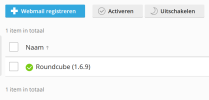
When re-activating Roundcube in the webmail settings this isn't working and the box become unchecked again when activating.
i run a Rocky Linux 8.10 with Plesk Obsidian 18.0.64 since a couple of weeks, because the EOL of CentOS
Today i found out the webmail isn't working anymore.
When re-activating Roundcube in the webmail settings this isn't working and the box become unchecked again when activating.