Facebook
 Twitter
Hi
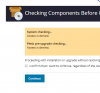
I am running Plesk Onyx Version 17.5.3 Update #68 and planning to upgrade 17.8.11. Follow the guideline looks very straight forward but from my site it show access denied. I am looking what kind of files need to be allow..
System checking...
Access is denied.
Plesk pre-upgrade checking...
Access is denied.
Need help..
Thanks..
I am running Plesk Onyx Version 17.5.3 Update #68 and planning to upgrade 17.8.11. Follow the guideline looks very straight forward but from my site it show access denied. I am looking what kind of files need to be allow..
System checking...
Access is denied.
Plesk pre-upgrade checking...
Access is denied.
Need help..
Thanks..