• Halloween is coming! To celebrate the occasion, we dusted off a couple of old skins, and even created a brand new one (Pixel).
    To get into the festive spirit, install the Skins extension.
  • The new Python extension is now available. It allows customers to deploy and manage WSGI-based Python applications on their websites directly from Plesk.
  • The Plesk Mobile apps for iOS and Android and the Plesk Mobile Center extension have been deprecated, and are no longer available for new installations. In Plesk Obsidian 18.0.84, the Plesk Mobile Center extension will be removed from servers during the upgrade, and the Plesk Mobile apps will lose their server management features.
  • The Social Login extension has been deprecated and will be removed in Plesk Obsidian 18.0.84. After that, it will no longer be possible to log in to Plesk with a Google, Facebook, GitHub account, or with a passkey. Plesk usernames and passwords, as well as logging in with a WebPros Account, are not affected.

Issue MariaDB Upgrade from 10.11.19 to 11.8 / 12.3 fails during pre-upgrade checks – unknown variable 'max_allowed_packet=64M'

se2e-dev

Basic Pleskian
Server operating system version
Debian 12.15
Plesk version and microupdate number
18.0.82 Update 2
I'm trying to upgrade MariaDB using the built-in MariaDB Upgrade feature in Plesk.

**Current database configuration:**
- Database server type: MySQL / MariaDB / Percona
- Current MariaDB version: 10.11.19
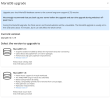
- Available upgrade versions in Plesk: MariaDB 11.8 and 12.3

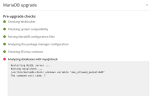
Unfortunately, the upgrade cannot proceed because the pre-upgrade checks fail at the step **"Analyzing databases with mysqlcheck"**.

All previous checks pass successfully, including system compatibility and parsing MariaDB configuration files.

**Error message:**

Code:
Restarting MySQL server ...
Running mysqlcheck ...
/usr/bin/mariadb-check: unknown variable 'max_allowed_packet=64M'
The command exit code: 7

The `max_allowed_packet=64M` setting itself is valid in MariaDB, so I'm unsure why `mariadb-check` rejects it during the Plesk pre-upgrade checks.

**My questions:**

1. Is this a known issue with the built-in Plesk MariaDB Upgrade feature?
2. Why does the configuration parsing check pass, but the subsequent `mysqlcheck` step fails?
3. Is there an official fix or recommended workaround?
4. Can this issue be resolved without removing the `max_allowed_packet` configuration entirely?

I would prefer to complete the upgrade directly through the Plesk interface rather than performing a manual MariaDB upgrade.

I've attached screenshots showing the available upgrade versions and the exact error message.

Any help or advice would be greatly appreciated.

Thank you!
 

Attachments

  • MariaDB_Update-001.png
    MariaDB_Update-001.png
    61.1 KB · Views: 2
  • MariaDB_Update-002.png
    MariaDB_Update-002.png
    114.7 KB · Views: 2
Hi @se2e-dev,

thanks for the detailed report and the screenshots, that makes it much easier to look at.

Let me start with what the error message itself tells us, because it already narrows things down quite a bit:

/usr/bin/mariadb-check: unknown variable 'max_allowed_packet=64M'

The message does not come from the MariaDB server and not from Plesk, it comes from the client program mariadb-check (the new name of mysqlcheck) itself. Client programs read option files, but only certain groups: [client], [client-server], [mysqlcheck], [mariadb-check] and a few others. If a line sits in one of those groups and the program doesn't know that option, it aborts with exactly this "unknown variable" error. So the setting itself is fine for the server, but it very likely sits in a group that mariadb-check also reads, and mariadb-check does not accept it there.

I can't see your configuration, so I can't tell you which file and which group it is. But you can find out in two quick steps.

Step 1 - Find out where the line is defined:
Code:
grep -rn "max_allowed_packet" /etc/mysql/ /etc/my.cnf /root/.my.cnf 2>/dev/null

Step 2 - See what mariadb-check actually reads from the option files:
Code:
mariadb-check --print-defaults

If max_allowed_packet=64M shows up in that output, that is the culprit. (Passwords are masked in this output, but please have a quick look before you paste anything into the forum.)

To answer your questions:
1) I can't say whether this is a known Plesk issue. What I can say is that the error is produced by the mariadb-check binary when it reads your option files, so it should be reproducible without Plesk.

2) About the config parsing check passing: I don't know how Plesk's parser works internally, so I won't guess there. What is certain is that the failing step runs the real mariadb-check binary, and that binary rejects the option.

3) + 4) You don't have to remove the setting. The usual approach is to keep it in the server group, so that only the server reads it. Make a backup first:
Code:
cp -a /etc/mysql /root/etc-mysql-backup-$(date +%F)

Then edit the file you found in step 1 so that the line lives under [mysqld] (or [mariadbd]) and not under [client], [client-server], [mysqlcheck] or [mariadb-check]. For example:
Code:
[mysqld]
max_allowed_packet = 64M

If you also need a larger packet size for the command line tools, you can set it only for the tools that support it, for example:
Code:
[mysql]
max_allowed_packet = 64M
[mysqldump]
max_allowed_packet = 64M

After that, restart MariaDB and check that the server still uses the value (64M = 67108864 bytes):
Code:
systemctl restart mariadb
mariadb -e "SHOW VARIABLES LIKE 'max_allowed_packet';"

Run the print-defaults command from step 2 once more. If max_allowed_packet no longer appears there, you can start the MariaDB upgrade from the Plesk interface again, and the pre-upgrade check should get past the mysqlcheck step.

If the grep output looks different from what I described (for example the line is already under [mysqld]), please post the relevant parts of the grep and print-defaults output (without any passwords), and we can take a closer look.

And as always with a database upgrade: please make sure you have a fresh backup before you start. Good luck, and let us know how it goes!

Regards
Tessa
 
Back
Top