
 Facebook
 Twitter
Hi all,
I'm trying to replicate our live website environment that uses Plesk. I'm having trouble getting it setup.
I have successfully installed Plesk Obsidian on Ubuntu 16.04 inside my VM using NAT networking from the following link: Index of /iso
I have Plesk working and I can access it outside the VM using http://localhost/, but now I'm unsure how to setup our website.
I created a new domain in Plesk called: testsaw.co.uk and it assigned the following IP to it: 10.0.2.15 - using the 'Preview' link within Plesk does nothing [it times out] and generates this URL: http://10.0.2.15/plesk-site-preview/testsaw.co.uk/https/10.0.2.15/
I'm rather new to this and wondering how I connect to the website? I've done countless searches through various engines and I'm at a roadblock.
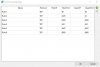
The following ports are open and I'm not sure if these are setup properly too.
I'm trying to replicate our live website environment that uses Plesk. I'm having trouble getting it setup.
I have successfully installed Plesk Obsidian on Ubuntu 16.04 inside my VM using NAT networking from the following link: Index of /iso
I have Plesk working and I can access it outside the VM using http://localhost/, but now I'm unsure how to setup our website.
I created a new domain in Plesk called: testsaw.co.uk and it assigned the following IP to it: 10.0.2.15 - using the 'Preview' link within Plesk does nothing [it times out] and generates this URL: http://10.0.2.15/plesk-site-preview/testsaw.co.uk/https/10.0.2.15/
I'm rather new to this and wondering how I connect to the website? I've done countless searches through various engines and I'm at a roadblock.
The following ports are open and I'm not sure if these are setup properly too.

