
 Facebook
 Twitter
Thomas Oryon
Regular Pleskian
Hello Support,
We have the below questions on the MFA enabling page. We have enforced all the user's to enable the MFA via panel.ini file using the below code
++++
[ext-mfa]
enforce = true
allowSkipEnforce = false
allowSkipRSession = true
++++
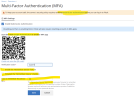
When we go to the MFA setup page we have the below line [highlighted in the image too]
1. To keep your account safe, the server's security policy requires enabling multi-factor authentication before you can log in to Plesk.
On this line we have link on the "multi-factor authentication", when we click on that it redirects to the Plesk official page "https://support.plesk.com/hc/en-us/...orces-me-to-use-two-factor-authentication-2FA"
Here, is that possible to remove entire line?
2. There are some options as below
Enable the Remember Device feature
Preselect the Remember Device checkbox
Days to remember this device
Here, we don't need these options and is that possible to remove these lines too?
Awaiting your reply.
We have the below questions on the MFA enabling page. We have enforced all the user's to enable the MFA via panel.ini file using the below code
++++
[ext-mfa]
enforce = true
allowSkipEnforce = false
allowSkipRSession = true
++++
When we go to the MFA setup page we have the below line [highlighted in the image too]
1. To keep your account safe, the server's security policy requires enabling multi-factor authentication before you can log in to Plesk.
On this line we have link on the "multi-factor authentication", when we click on that it redirects to the Plesk official page "https://support.plesk.com/hc/en-us/...orces-me-to-use-two-factor-authentication-2FA"
Here, is that possible to remove entire line?
2. There are some options as below
Enable the Remember Device feature
Preselect the Remember Device checkbox
Days to remember this device
Here, we don't need these options and is that possible to remove these lines too?
Awaiting your reply.


