
 Facebook
 Twitter
On my system are some firewall rules active. This rules are blocking the standard-Plesk-Port :8443
on every domain except one domain for my customers. I don’t like this, when every domain has an open port.
The rules are working fine. 99,9% of all points of menue in Plesk are running normal.
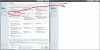
But not the FTP-Account-Management. Please look at my attached screenshot.
The URL,
https://myserverpleskdomain.xyz/smb/web/ftp-access
will be redirected to:
https://myserverpleskdomain.xyz/smb...src=/smb/web/view&srcController=WebController
And after this redirect, my users see the 404´er error in their browser.
Here are my rules from vhost_ssl.conf:
<IfModule mod_proxy.c>
SSLProxyEngine On
ProxyRequests Off
ProxyPass /phpMyAdmin !
ProxyPass /manual !
ProxyPass /picture_library !
ProxyPass /plesk-stat !
ProxyPass / https://127.0.0.1:8443/
ProxyPassReverse / https://127.0.0.1:8443/
<Proxy *>
Order deny,allow
Deny from none
Allow from all
</Proxy>
</IfModule>
Here are my rules from vhosts.conf
Redirect / https://myserverpleskdomain.xyz/
I know, you don´t like any changes like this.
But I don´t like any open ports in my system.
I have one domain with Plesk-Access for my customers.
Should I kill the firewall rules?
Do you know any workarounds for this problem?
Why does the Plesk-Panel work different in FTP-Account-Settings (99,9% works fine)?
What do you think about my question? Can you help me?
Thanks for your help!!!
Nice day....
bye Bernd S.
on every domain except one domain for my customers. I don’t like this, when every domain has an open port.
The rules are working fine. 99,9% of all points of menue in Plesk are running normal.
But not the FTP-Account-Management. Please look at my attached screenshot.
The URL,
https://myserverpleskdomain.xyz/smb/web/ftp-access
will be redirected to:
https://myserverpleskdomain.xyz/smb...src=/smb/web/view&srcController=WebController
And after this redirect, my users see the 404´er error in their browser.
Here are my rules from vhost_ssl.conf:
<IfModule mod_proxy.c>
SSLProxyEngine On
ProxyRequests Off
ProxyPass /phpMyAdmin !
ProxyPass /manual !
ProxyPass /picture_library !
ProxyPass /plesk-stat !
ProxyPass / https://127.0.0.1:8443/
ProxyPassReverse / https://127.0.0.1:8443/
<Proxy *>
Order deny,allow
Deny from none
Allow from all
</Proxy>
</IfModule>
Here are my rules from vhosts.conf
Redirect / https://myserverpleskdomain.xyz/
I know, you don´t like any changes like this.
But I don´t like any open ports in my system.
I have one domain with Plesk-Access for my customers.
Should I kill the firewall rules?
Do you know any workarounds for this problem?
Why does the Plesk-Panel work different in FTP-Account-Settings (99,9% works fine)?
What do you think about my question? Can you help me?
Thanks for your help!!!
Nice day....
bye Bernd S.
Last edited: