• Debian 11 is approaching its end-of-life (vendor EOL date - August 31, 2026). Plesk Obsidian 18.0.80 will be the last release to support it.
    If you are running Plesk Obsidian on Debian 11, we recommend you upgrade those servers to Debian 12 using our dist-upgrade tool.
  • We plan to deprecate and remove the support for XML RPC protocol versions earlier than 1.6.9.1 in Plesk Obsidian 18.0.82. We strongly recommend that you update all existing integrations using earlier versions of the XML RPC protocol to comply with the version 1.6.9.1 specification.

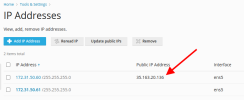
Issue "Public IP Address" field - How to disable or change

BigD213

New Pleskian
Server operating system version
Ubuntu 20.04.4 LTS
Plesk version and microupdate number
Plesk Obsidian Version 18.0.45
ip-arrow.png
I have to keep logging in to clear this entry under "Public IP Address".

I have a unique LAN configuration that requires that this field is clear. I have also tried setting it to the LAN IP. A few days later, it automatically changes itself.

1 - How do I prevent this field from automatically updating itself?
2 - How can I clear this field from the command line?
3 - How can I disable this feature entirely?
 
- Identify the interface on which the Public IP address is located:

# ip a
2: venet0: <BROADCAST,POINTOPOINT,NOARP,UP,LOWER_UP> mtu 1500 qdisc noqueue state UNKNOWN
link/void
inet 192.0.2.2/32 brd 10.39.81.154 scope global eth0
inet 203.0.113.2/8 scope global eth0:1

- Remove the IP address from the interface:

# ip addr del 203.0.113.2/8 dev eth0

- Remove the old IP address:

# plesk db "delete from IP_Addresses where ip_address='203.0.113.2'"
 
Back
Top