• The APS Catalog has been deprecated and removed from all Plesk Obsidian versions.
    Applications already installed from the APS Catalog will continue working. However, Plesk will no longer provide support for APS applications.
  • Please be aware: with the Plesk Obsidian 18.0.78 release, the support for the ngx_pagespeed.so module will be deprecated and removed from the sw-nginx package.

Issue "Public IP Address" field - How to disable or change

BigD213

New Pleskian
Server operating system version
Ubuntu 20.04.4 LTS
Plesk version and microupdate number
Plesk Obsidian Version 18.0.45
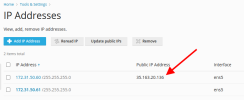
ip-arrow.png
I have to keep logging in to clear this entry under "Public IP Address".

I have a unique LAN configuration that requires that this field is clear. I have also tried setting it to the LAN IP. A few days later, it automatically changes itself.

1 - How do I prevent this field from automatically updating itself?
2 - How can I clear this field from the command line?
3 - How can I disable this feature entirely?
 
- Identify the interface on which the Public IP address is located:

# ip a
2: venet0: <BROADCAST,POINTOPOINT,NOARP,UP,LOWER_UP> mtu 1500 qdisc noqueue state UNKNOWN
link/void
inet 192.0.2.2/32 brd 10.39.81.154 scope global eth0
inet 203.0.113.2/8 scope global eth0:1

- Remove the IP address from the interface:

# ip addr del 203.0.113.2/8 dev eth0

- Remove the old IP address:

# plesk db "delete from IP_Addresses where ip_address='203.0.113.2'"
 
Back
Top