Facebook
 Twitter
Hello,
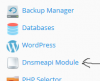
Recently installed a module to test and this is no longer required, while the module/extension removed the link to that module remains in the users portal on the right-side menu as shown in attached screen.
Would appreciate any insight to remove this related link.
Thank you,
Chad
Recently installed a module to test and this is no longer required, while the module/extension removed the link to that module remains in the users portal on the right-side menu as shown in attached screen.
Would appreciate any insight to remove this related link.
Thank you,
Chad