Facebook
 Twitter
nethubonline
Regular Pleskian
- Server operating system version
- Windows Server 2022
- Plesk version and microupdate number
- 18.0.79
Hello,
We discovered that Git for Windows and Node.js hosting features (specifically the Node.js IIS module / iisnode) are installed on our server. We never explicitly chose to install these components, meaning they were automatically deployed during a Plesk update at some point without our active intent.
Our server environment does not require Git or Node.js hosting capabilities, so we attempted to uninstall them using the Plesk Installer (via Tools and Settings > Updates).
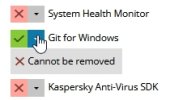
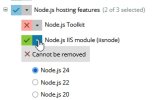
However, we found that we are completely blocked from doing so. In the Plesk Installer component selection menu, both components are locked out with a grayed-out "Cannot be removed" status message.
Please refer to the attached screenshots for details:
- git.jpg shows the locked status of "Git for Windows".
- node.js.jpg shows the locked status of "Node.js IIS module (iisnode)".
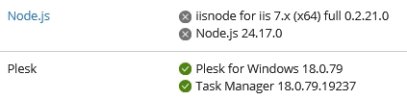
- Plesk_components.jpg shows Node.js is not used
Why are these components treated as mandatory dependencies, and why is the option to uninstall them completely disabled in the Plesk UI?
Is there an official workaround or a specific CLI command to safely strip these unwanted modules from our Plesk installation without breaking core panel functionality?
Any insights or assistance would be greatly appreciated.
Thank you.
We discovered that Git for Windows and Node.js hosting features (specifically the Node.js IIS module / iisnode) are installed on our server. We never explicitly chose to install these components, meaning they were automatically deployed during a Plesk update at some point without our active intent.
Our server environment does not require Git or Node.js hosting capabilities, so we attempted to uninstall them using the Plesk Installer (via Tools and Settings > Updates).
However, we found that we are completely blocked from doing so. In the Plesk Installer component selection menu, both components are locked out with a grayed-out "Cannot be removed" status message.
Please refer to the attached screenshots for details:
- git.jpg shows the locked status of "Git for Windows".
- node.js.jpg shows the locked status of "Node.js IIS module (iisnode)".
- Plesk_components.jpg shows Node.js is not used
Why are these components treated as mandatory dependencies, and why is the option to uninstall them completely disabled in the Plesk UI?
Is there an official workaround or a specific CLI command to safely strip these unwanted modules from our Plesk installation without breaking core panel functionality?
Any insights or assistance would be greatly appreciated.
Thank you.