• Debian 11 is approaching its end-of-life (vendor EOL date - August 31, 2026). Plesk Obsidian 18.0.80 will be the last release to support it.
    If you are running Plesk Obsidian on Debian 11, we recommend you upgrade those servers to Debian 12 using our dist-upgrade tool.
  • We plan to deprecate and remove the support for XML RPC protocol versions earlier than 1.6.9.1 in Plesk Obsidian 18.0.82. We strongly recommend that you update all existing integrations using earlier versions of the XML RPC protocol to comply with the version 1.6.9.1 specification.

Issue Roundcube 1.4.11 on Obsidian NOT show "Archive" folder and icon

Lucaele

New Pleskian
Hi all,
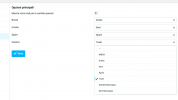
on Obsidian, RoundCube 1.4.11 not show "Archive" folder and icon.

On Preferences->Special Folders there aren't any information for "Archive".

How can i fix it?

Thanks!

Schermata 2021-10-29 alle 19.10.02.png
 
As far as I know "Archive" has never been a default folder on RoundCube.

However, there is an Archive pulg-in available by default. You'll just have to active/add the plugin to your $config['plugins'] of the config.inc.php file of your Roundcube installation.
 
Last edited:
Back
Top