• The APS Catalog has been deprecated and removed from all Plesk Obsidian versions.
    Applications already installed from the APS Catalog will continue working. However, Plesk will no longer provide support for APS applications.
  • Please be aware: with the Plesk Obsidian 18.0.78 release, the support for the ngx_pagespeed.so module will be deprecated and removed from the sw-nginx package.

Resolved Roundcube managesieve not working with external mail client?

lukas-degan

Basic Pleskian
Hi all,

is it normal, that roundcube filters are not working when an external mailclient such as thunderbird or outlook is used?
Is it possible to run the filter in the background, when roundcube is not used?

I have an filter rule to move mails from an specific sender to an folder. In Roundcube it is working, in outlook it ist not.

I want to have one central filter setting. Is it possible?

Plesk version: 18.0.34 Update #2


Best regards,

Lukas
 
Filters set in Roundcube are executed at server level. So they should work on the mailbox no matter if you connect to the mailbox from a email client such as Outlook or if you're just using webmail.

With what protocol are you connecting to the mailbox when using Outlook? Trough IMAP or POP3?
 
Filters set in Roundcube are executed at server level. So they should work on the mailbox no matter if you connect to the mailbox from a email client such as Outlook or if you're just using webmail.

With what protocol are you connecting to the mailbox when using Outlook? Trough IMAP or POP3?
Thx for your reply.
I use imap.
If i not logged in into Roundcube i get the mails in the inbox. I just must to login, then the mails get moved directly in the right folder.
Its definitly not working without roundcube login :(
 
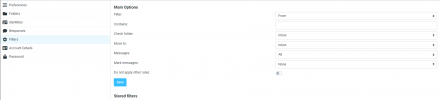
I don't recognize the Roudcube interface from your sreenshot. Out of curiosity how did you add the filter?
 
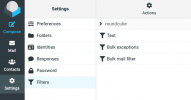
Interesting, that doesn't look like the default Plesk Roundcube filter interface. Did you install any custom Roundcube plugins? Mine looks like

Schermafbeelding 2021-04-05 om 20.14.41.png
 
Thank you very much!
I dont know why, but there was installed an 3rd party filter plugin.
I just tested it with the original one, there it is working like a charm.

Thanks for your help :)
 
Back
Top