• Halloween is coming! To celebrate the occasion, we dusted off a couple of old skins, and even created a brand new one (Pixel).
    To get into the festive spirit, install the Skins extension.
  • The new Python extension is now available. It allows customers to deploy and manage WSGI-based Python applications on their websites directly from Plesk.
  • The Plesk Mobile apps for iOS and Android and the Plesk Mobile Center extension have been deprecated, and are no longer available for new installations. In Plesk Obsidian 18.0.84, the Plesk Mobile Center extension will be removed from servers during the upgrade, and the Plesk Mobile apps will lose their server management features.
  • The Social Login extension has been deprecated and will be removed in Plesk Obsidian 18.0.84. After that, it will no longer be possible to log in to Plesk with a Google, Facebook, GitHub account, or with a passkey. Plesk usernames and passwords, as well as logging in with a WebPros Account, are not affected.

Resolved Run cron task command with arguments

eliamarsura

Basic Pleskian
Hi
I create a script with bash that's need some arguments

I try to schedule this on plesk panel but it is executed without arguments.

The command look like this:
bash /root/myscript.sh argument1 argument2 argument3

If I execute the script from shell everything work fine (argument1 become $1 and so on), but if I put this inside Scheduled Tasks (Cron jobs) in plesk it doesn't read the arguments.
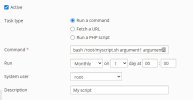
 

Attachments

  • Immagine 2022-02-21 234640.jpg
    Immagine 2022-02-21 234640.jpg
    25.2 KB · Views: 33
If I am not mistaken you don't have to prepend the command with bash. Just /root/myscript.sh argument1 argument2 argument3 should work.
 
Sorry to hear it didn't work. Did you try to output the results of the cronjob to a log file for debugging/analysis purposes?
 
Sorry, I meant that you output the content of your script to a file to log for your own debugging purposes.

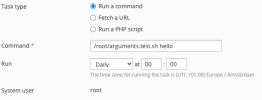
I've created a quick bash script for testing. For me using arguments in the cronjob seem to work fine.

Bash:
#!/bin/bash
# Set script permission: chmod +x argument.test.sh

echo "Argument: "${1}

My cronjob settings look like this:
Schermafbeelding 2022-02-22 om 21.21.27.png

This outputs: Argument: hello
 
Last edited:
Finally I found the solution!
The problem wasn't the arguments but the plesk command

I had to use
/usr/sbin/plesk ext sslit --certificate -issue -domain $1 -registrationEmail $2 -secure-domain -secure-mail -secure-webmail -wildcard

instead of
plesk bin ext sslit --certificate -issue -domain $1 -registrationEmail $2 -secure-domain -secure-mail -secure-webmail -wildcard

If I use "plesk bin" directly on command line it's work, but it doesn't work if I pass trough cronjob
 
Back
Top