• Debian 11 is approaching its end-of-life (vendor EOL date - August 31, 2026). Plesk Obsidian 18.0.80 will be the last release to support it.
    If you are running Plesk Obsidian on Debian 11, we recommend you upgrade those servers to Debian 12 using our dist-upgrade tool.
  • We plan to deprecate and remove the support for XML RPC protocol versions earlier than 1.6.9.1 in Plesk Obsidian 18.0.82. We strongly recommend that you update all existing integrations using earlier versions of the XML RPC protocol to comply with the version 1.6.9.1 specification.

Question Schedule start and end auto response in emails

macadia

Basic Pleskian
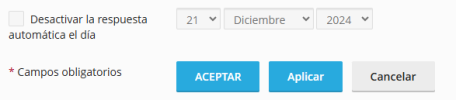
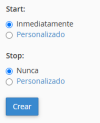
Hello, I would like to know if there is any way or extension that allows you to program the start and end of an auto response in an email account, such as cPanel has.

Plesk:
1734697836598.png

Cpanel:
1734697871445.png

Thanks a Merry Xmas :)
Martín
 
Are you trying to use webmail or do it through the panel? Cause you should be able to do. I use SOGo for the web mail and the vacation mode does allow you to set a date and time for when auto response is enabled and when it's disabled. Likewise, if you go the email account's settings in the panel you can choose when to switch it off (although it's not as specific compared to doing it through SOGo, I haven't tested it in any of the other webmail interfaces but I would think it's the same).
 
Hi, I set the auto response directly in the Plesk option -mail accounts -> auto response- but I only can set an end date. I want to set a start date too.

Thanks for your answer.
 
Hello, Martín. There is unfortunately no built in function to schedule the start of the automatic response. What you might do is creating a scheduled task (with the admin user) using mail auto responder utility and configure the cron to run at the desired time. For example:

/usr/sbin/plesk bin autoresponder --update -mail [email protected] -status true -end-date 2025-01-21 -subject "Your desired email subject" -text "Your desired email message"

If you decide to give it a go, please make sure to remove the scheduled task once you are no longer absent.
 
Back
Top