Follow along with the video below to see how to install our site as a web app on your home screen.
Note: This feature may not be available in some browsers.
We value your experience with Plesk during 2025 Plesk strives to perform even better in 2026. To help us improve further, please answer a few questions about your experience with Plesk Obsidian 2025. Please take this short survey: https://survey.webpros.com/
On Plesk for Linux mod_status is disabled on upgrades to improve Apache security. This is a one-time operation that occurs during an upgrade. You can manually enable mod_status later if needed.
Hello, I would like to know if there is any way or extension that allows you to program the start and end of an auto response in an email account, such as cPanel has.
Are you trying to use webmail or do it through the panel? Cause you should be able to do. I use SOGo for the web mail and the vacation mode does allow you to set a date and time for when auto response is enabled and when it's disabled. Likewise, if you go the email account's settings in the panel you can choose when to switch it off (although it's not as specific compared to doing it through SOGo, I haven't tested it in any of the other webmail interfaces but I would think it's the same).
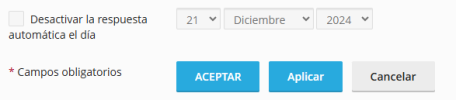
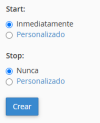
Hi, I set the auto response directly in the Plesk option -mail accounts -> auto response- but I only can set an end date. I want to set a start date too.
Hello, Martín. There is unfortunately no built in function to schedule the start of the automatic response. What you might do is creating a scheduled task (with the admin user) using mail auto responder utility and configure the cron to run at the desired time. For example: