• Debian 11 is approaching its end-of-life (vendor EOL date - August 31, 2026). Plesk Obsidian 18.0.80 will be the last release to support it.
    If you are running Plesk Obsidian on Debian 11, we recommend you upgrade those servers to Debian 12 using our dist-upgrade tool.
  • We plan to deprecate and remove the support for XML RPC protocol versions earlier than 1.6.9.1 in Plesk Obsidian 18.0.82. We strongly recommend that you update all existing integrations using earlier versions of the XML RPC protocol to comply with the version 1.6.9.1 specification.

"securityRiskFeature" not hiding Security-Risk score

skibbler

New Pleskian
Server operating system version
Ubuntu 24.04 x86_64
Plesk version and microupdate number
18.0.80.6
According to this Plesk KB article the Security-Risk score in WP-Toolkit should be hidden with:
Code:
[ext-wp-toolkit]
securityRiskFeature = false

But this setting does not appear to work in the (current) WP-Toolkit 6.11.2-10791 version, the Security-Risk score is still visible.

I'd like to hide it bc the "Security-Risk" rating can be misleading. As I understand it, the score represents the severity of known vulnerabilities in WP core, plugins and themes. It does not indicate whether a WP installation is compromised or whether its files have been tampered with.

We already had some cases where customers referred to a 0.0 rating as evidence that recurring malicious files could not originate from their WP installation. Ofc, a 0.0 vulnerability risk score does not mean the installation itself is clean or uncompromised.

Is "securityRiskFeature = false" still supported, or is there currently another way to hide this rating while keeping vulnerability detection enabled?

Thanks.
 
@skibbler I don't see 'securityRiskFeature' listed in the panel.ini editor 'settings' which usually indicates its been removed or never existed.

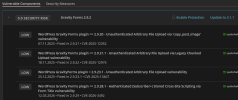
Some of the scores are very ...questionable, see attached pic of Gravity Forms with a risk score of 0.0 and yet contains more than one Unauthenticated Arbitrary File Upload Vulnerability, each of which should get a CVSS score in the high 9's. No idea how it comes up with these scores but they seem.. off. Maybe its like an MX record where highest is the lowest number?

This at least works, you can have the extension hide certain 'vulnerabilities' that will never be fixed by WP although I appreciate its not what you were looking for.
vulnerabilityIgnoreList = "CVE-2017-14990, CVE-2022-3590, CVE-PS-9662, WF-112ed4f2-fe91-4d83-a3f7-eaf889870af4-2d10b6f12f37a6901c91ee8af9c99bbd, WF-9fda5e15-fdf9-4b67-93d3-2dbfa94aefe9-2d10b6f12f37a6901c91ee8af9c99bbd"
 

Attachments

  • Screenshot 2026-09-07 at 10-03-59.png
    Screenshot 2026-09-07 at 10-03-59.png
    50.8 KB · Views: 1
@burnley you’re right that "securityRiskFeature" is not listed in the panel.ini editor. Interestingly "vulnerabilityIgnoreList" is not listed there either (if i add "vulnerabilityIgnoreList" manually to panel.ini, it shows up in the editor, if I remove/comment it out, it disappears from the editor), but that option does work and we’ve been using it for a while. "securityRiskFeature" on the other hand, is explicitly documented in the Plesk KB but currently does not seem to have any effect.

And yes your Gravity Forms example is another good illustration of the problem.

My main issue is the wording “Security-Risk” and how prominently the label is presented, including the information shown when clicking on it. The score appears to be based mainly on known vulnerabilities associated with the installed versions of WP core, plugins and themes, so it is much closer to an update-needed-/exposure-score than an overall security assessment.

Calling it "Security-Risk" gives customers/users the impression that it says something about the overall security and maybe integrity including plugins/themes of the installation, which it does not. In our case, simply being able to hide that score with the documented panel.ini option would already solve the problem.
 
Back
Top