
 Facebook
 Twitter
Hi,
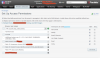
I am brand new to Plesk and VPS. I have a right issues on a directory where I would like to specify read, write and delete (no execute). I thought the print screen show below was the place to go but it's either "Full control". Anyway I have tried just about everything but can't stop to get Access to the path xxxxx is denied. What did am I missing ?
I am brand new to Plesk and VPS. I have a right issues on a directory where I would like to specify read, write and delete (no execute). I thought the print screen show below was the place to go but it's either "Full control". Anyway I have tried just about everything but can't stop to get Access to the path xxxxx is denied. What did am I missing ?

