• Halloween is coming! To celebrate the occasion, we dusted off a couple of old skins, and even created a brand new one (Pixel).
    To get into the festive spirit, install the Skins extension.
  • The new Python extension is now available. It allows customers to deploy and manage WSGI-based Python applications on their websites directly from Plesk.
  • The Plesk Mobile apps for iOS and Android and the Plesk Mobile Center extension have been deprecated, and are no longer available for new installations. In Plesk Obsidian 18.0.84, the Plesk Mobile Center extension will be removed from servers during the upgrade, and the Plesk Mobile apps will lose their server management features.
  • The Social Login extension has been deprecated and will be removed in Plesk Obsidian 18.0.84. After that, it will no longer be possible to log in to Plesk with a Google, Facebook, GitHub account, or with a passkey. Plesk usernames and passwords, as well as logging in with a WebPros Account, are not affected.

Question SFTP - stop access to folders/files above the main path root

weareimpulse

Basic Pleskian
Server operating system version
Ubuntu 22.04.5 LTS
Plesk version and microupdate number
Plesk Obsidian 18.0.66 Update #2
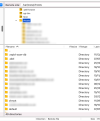
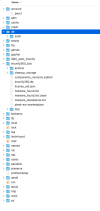
hi, i;ve just had an IT company point out to me that, when i gave them some space to upload some files to a sepcific website, they could click upwards in the folder path, accessing the folders of the server, and although they couldn't access the other client on the server, they could see all of our other clients in the vhosts folder.
If i give out FTP details for a specfic client, i only want the details to give access to that client... nowhere else...


Any help or advise would be great!

thanks - Tim
 

Attachments

  • Screenshot 2025-01-14 at 15.22.44.png
    Screenshot 2025-01-14 at 15.22.44.png
    74.3 KB · Views: 8
  • Screenshot 2025-01-14 at 15.27.39.png
    Screenshot 2025-01-14 at 15.27.39.png
    62.2 KB · Views: 7
Back
Top