Follow along with the video below to see how to install our site as a web app on your home screen.
Note: This feature may not be available in some browsers.
The APS Catalog has been deprecated and removed from all Plesk Obsidian versions. Applications already installed from the APS Catalog will continue working. However, Plesk will no longer provide support for APS applications.
Please be aware: with the Plesk Obsidian 18.0.78 release, the support for the ngx_pagespeed.so module will be deprecated and removed from the sw-nginx package.
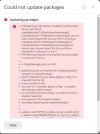
Looks like you have a record in PHP ini file for loading missing gd2.so module.
First make sure that is is so with:
Code:
# /opt/plesk/php/7.4/bin/php -m | grep gd
you should see something like:
Code:
PHP Warning: PHP Startup: Unable to load dynamic library 'gd2' (tried: /opt/plesk/php/7.4/lib64/php/modules/gd2 (/opt/plesk/php/7.4/lib64/php/modules/gd2: cannot open shared object file: No such file or directory), /opt/plesk/php/7.4/lib64/php/modules/gd2.so (/opt/plesk/php/7.4/lib64/php/modules/gd2.so: cannot open shared object file: No such file or directory)) in Unknown on line 0
gd
Find ini file with incorrect record:
Code:
# egrep -R gd2 /opt/plesk/php/7.4/etc/ -s
Then open ini file and comment line with record like: