• Halloween is coming! To celebrate the occasion, we dusted off a couple of old skins, and even created a brand new one (Pixel).
    To get into the festive spirit, install the Skins extension.
  • The new Python extension is now available. It allows customers to deploy and manage WSGI-based Python applications on their websites directly from Plesk.
  • The Plesk Mobile apps for iOS and Android and the Plesk Mobile Center extension have been deprecated, and are no longer available for new installations. In Plesk Obsidian 18.0.84, the Plesk Mobile Center extension will be removed from servers during the upgrade, and the Plesk Mobile apps will lose their server management features.
  • The Social Login extension has been deprecated and will be removed in Plesk Obsidian 18.0.84. After that, it will no longer be possible to log in to Plesk with a Google, Facebook, GitHub account, or with a passkey. Plesk usernames and passwords, as well as logging in with a WebPros Account, are not affected.

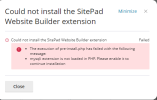
Resolved Sitepad need Mysql

scoccia

New Pleskian
Hi, when I try to install Sitepad from extension write me that I don't have Mysql (impossibile)

1641816543683.png

OS Ubuntu 20.04.3 LTS
Plesk Obsidian Version 18.0.40

How can fix it?
Tnx
 
The error message tells you the mysqli (notice the letter i on the end) extension for PHP hasn't been loaded. Thats not the same as MYSQL itself.

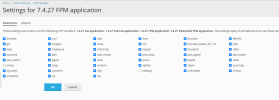
In Plesk go to Tools & Settings > PHP Settings and click on the PHP version you're using and make sure the mysqli extension is checked and it save. Repeat for other PHP versions if needed.
 
hi, thank you for the reply
Mysqli is enable for all version
1641832068477.png
but if I try from root php -m is not enabled... is possibile that Plesk use different php.ini?
 
mysqli PHP module is loaded for all Plesk PHP handlers. Look at this:

Code:
root@distracted-rosalind:~# /opt/plesk/php/7.3/bin/php -m | grep mysqli
mysqli
root@distracted-rosalind:~# /opt/plesk/php/7.4/bin/php -m | grep mysqli
mysqli
root@distracted-rosalind:~# /opt/plesk/php/8.0/bin/php -m | grep mysqli
mysqli

This may not be loaded for PHP from the OS vendor (like you check it with 'php -m' in the command line).
In this case, make sure that php-mysql package from the OS vendor is installed on your server and install it for Ubuntu/Debian:

# apt install php-mysql

Or for CentOS:

# yum install php-mysql

After that you should see:

# php -m | grep mysqli
mysqli
 
Back
Top