Follow along with the video below to see how to install our site as a web app on your home screen.
Note: This feature may not be available in some browsers.
The APS Catalog has been deprecated and removed from all Plesk Obsidian versions. Applications already installed from the APS Catalog will continue working. However, Plesk will no longer provide support for APS applications.
Please be aware: with the Plesk Obsidian 18.0.78 release, the support for the ngx_pagespeed.so module will be deprecated and removed from the sw-nginx package.
Hello,
I installed the Skins and Color Schemes extension, but I didn't get but the two primary selections. Any suggestions?
Thanks, Vince View attachment 19758
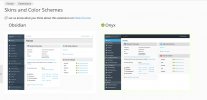
The themes are challenging to customize and simple task of branding with transparent background logo looks great in light mode, but dark mode looks like ****. Seems like the login color scheme behind the logo should accommodate without having to create a custom theme. Why can't we have more than two nearly identical themes?